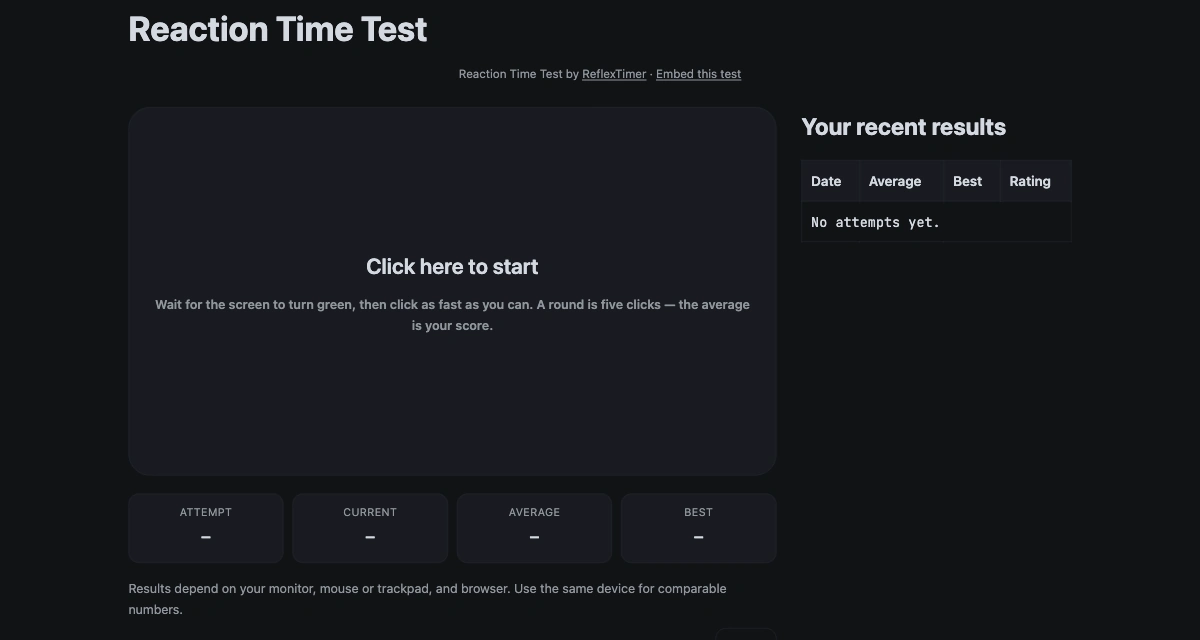
You do not need to build a reaction test to give your readers one. This page hands you a free, ready-made widget: a single iframe tag that lets you embed a reaction time test inside your own page. The embed keeps the parts that matter — the test board, the millisecond readout, the rating and the local history — and drops the site navigation, the long articles and the test directory. Installation takes about a minute, works on desktop and mobile, and needs no account, no API key and no cookies. Below is a live copy of exactly what your visitors will see, the snippet to copy, and straight answers about sizing, attribution and data.
Why embed a reaction time test
Reaction time is one of the few measurements almost everyone has an opinion about. A static article can explain that a typical adult response lands somewhere around 200 to 250 milliseconds, but the sentence stays abstract until the reader has a board in front of them that turns green and records their own click. That is the whole argument for an embed: the reader stops reading about a number and produces one. The same five attempts that take a minute on our site take a minute on yours, with no redirect and no new tab.
The practical cases differ only in who is watching. A teacher gets a live demonstration that every student can run on their own device. A forum thread gets a shared number to compare and argue about. A blog post about sleep, caffeine or gaming keeps the reader on the page instead of sending them to a separate tool. A stream gets a segment the host and chat can play together. In each case the page around the board stays yours: your layout, your voice, your article. The frame is deliberately small and self-contained, so it cannot leak styles or scripts into your page, and you can remove it by deleting one line.
Live preview of the reaction time test widget
The frame below is the real embed, not a screenshot. Click the board, wait for the green signal, and click as fast as you can. A round is five attempts, and the average of those five is your score. It loads from reflextimer.com, so what you see here is exactly what your visitors get.
Live embed · 640px tall · loads lazily when it approaches the viewport
Copy the embed code
The snippet is ordinary HTML — no script tag and no JavaScript on your side. Paste it wherever your page accepts HTML, such as a custom HTML block in WordPress, Ghost or Squarespace, or straight into a static template, then publish. The title attribute gives the frame an accessible name for screen readers, so keep it when you edit the rest.
<iframe src="https://reflextimer.com/?embed=1" height="640" title="Reaction Time Test by ReflexTimer" loading="lazy" style="width:100%;border:0"></iframe>If your editor strips iframes, use its custom HTML or embed block. Some forums only allow a plain link, in which case link to the test instead of framing it.
Size and responsive behavior
Width is set with CSS (style="width:100%") and height with the height attribute. A fluid width lets the frame follow its container, and 640 is the height we recommend for the full board; the credit line sits directly under the test title, so it stays visible at that height. The local-results table and the KPI row below the board may need a short scroll on narrow frames — use height="720" if you want more of them visible. The board is sized from the iframe's own viewport rather than from your page: on a desktop-sized frame it uses 64% of the frame height, capped at 640px, and at 600px of frame width or narrower it drops to 56% so the layout stays comfortable. That is why the same snippet works in a wide article column and in a narrow forum post without a second version.
Change the numbers when your layout needs it. A sidebar might take height="560" with style="width:320px"; a full-width hero might take height="720". Below roughly 420px the board and the result panel start to compete for vertical space, so treat 640 as the honest default rather than a maximum. The frame never widens your page: it is a block element sized by its attributes, and the only element on this page that scrolls sideways is the code block above. The loading="lazy" attribute delays the frame until it is close to the viewport, which keeps it out of your initial page load.
Attribution and license
The credit line is the single line directly under the test title: “Reaction Time Test by ReflexTimer · Embed this test.” It is plain text inside the frame, not an overlay, so it never covers the board or intercepts a click. Both links open in a new tab, so a visitor who follows one does not lose their round. The line is the only attribution the widget asks for.
Embedding is free for personal and commercial pages, with no sign-up, license fee or permission email. Keep the credit line intact and do not present the test as your own product; beyond that there is nothing to negotiate. We do not offer a white-label build or a paid removal option, and there is no license file to fetch — the terms on this page are the terms.
Privacy and data
The widget sets no cookies and asks for no account. Scores and history are written to the browser's local storage under the reflextimer.com origin, not yours; the frame cannot read your page's storage, and your page cannot read the frame's. If a visitor taps “Add my result”, the frame sends only an anonymous bucket count — a time bucket, not a name, email address or score tied to an identity — to our aggregate statistics endpoint. Everything else, including the five attempts and the history table, stays in that browser.
Our hosting provider keeps short-lived technical request logs, as every website does, for security and abuse prevention. When the frame is embedded on another site, browsers may partition storage for third-party frames, so a visitor's results in your copy can be separate from their results on reflextimer.com; that is expected behaviour, not a bug. Because the widget itself sets no cookies, there is no consent banner to add for it — though your own site's analytics and consent rules still apply to your page.
Use cases: classroom, forum, blog, and stream
Classroom
A projector and one browser tab are enough to turn a statistics or biology lesson into a measurement the students produce themselves. Everyone runs the same five attempts, the class compares averages, and the discussion moves to sleep, device lag and attention. No accounts means no student data to collect or protect.
Forum
Post the snippet in a thread that already argues about reaction speed and let members report their own five-attempt averages. The test runs inside the post, so nobody has to leave the conversation. Numbers stay self-reported and local; there is no leaderboard to moderate.
Blog
Place the widget after the paragraph that makes the claim — a post about caffeine, sleep debt or gaming hardware is the natural fit. The reader can test the point immediately, then keep reading. Longer background lives on our average reaction time and reaction time by age pages if you would rather link than embed.
Stream
Load the widget in a browser source or a second window and have the host take a round while chat posts their averages. It needs no login, no install and no moderation tools, which makes it a low-friction segment between matches or topics.
To embed a reaction time test on your own page, the snippet above is all you need; the test is the same one you can play on our reaction time test page, with the measurement rules described on the methodology page. If the frame does not fit the story you are telling, the CPS test, number memory test and spacebar clicker each have their own page; and if you are writing about training rather than measuring, our guide to improving reaction time is the better link.
Frequently asked questions
Is the widget really free?
Yes. The embed is free for personal and commercial pages, with no sign-up, license fee or permission request. The credit line below the test area is part of the frame — keep it intact, and do not present the test as your own product.
Do I need an account or API key?
No. The iframe points at a public URL, so there is nothing to register and no key to paste. Copy the snippet, paste it into any block that accepts HTML, and the test appears on the next page load.
Does it work on mobile?
Yes. The board accepts taps as well as clicks and switches to a 56vh height when the frame is 600px wide or narrower, so it fits phone screens. The 640px default height is a desktop recommendation; you can lower or raise it in the iframe tag without breaking the test.
Will it slow my page down?
Very little. The widget is one iframe with a single HTML document, one stylesheet and one small script, and there are no ads, third-party trackers or webfont requests blocking your page. The loading="lazy" attribute keeps the frame from loading until it is close to the viewport.
Can I change the size or colors?
You can change the size and cannot change the colors. Width is ordinary CSS (style="width:100%") and height is the height attribute: height="640" is our default, and any size that fits your layout works. Colours follow the visitor's light or dark preference on the ReflexTimer side, and the embed URL has no colour parameter.