If you are looking for a Human Benchmark alternative — a reaction time test like Human Benchmark's, or one with a different strength — this page is for you. We build ReflexTimer, one of the alternatives below, so this comparison comes from an interested party: we opened every site, checked what it actually does, and say so when a competitor does something better. Details a site does not state are marked "Not stated," not guessed.
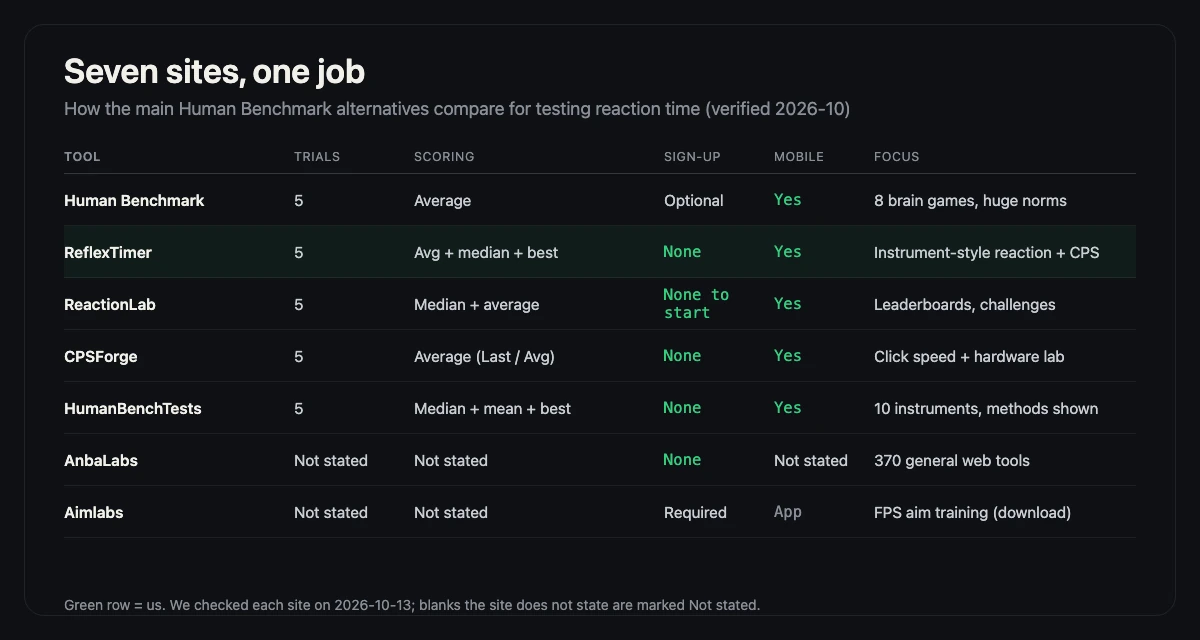
The comparison table
Every entry was checked by opening the site itself in October 2026; "trials" is attempts per scored round. For a focused review of the original Human Benchmark test itself, see our Human Benchmark reaction time test review. This is a feature-and-specification review, not a controlled latency benchmark: we did not run every site on identical hardware, we did not measure each site's response time, and scores from different sites are not directly comparable. "Not stated" means the site did not publish that detail; "verified" means we checked the page itself on that date.
| Tool | Trials per round | Average or median | Sign-up needed | No download | Works on mobile | Extra tests | Best for |
|---|---|---|---|---|---|---|---|
| Human Benchmark | 5 | Average (its stats call it "average (median)") | Optional — only for saved history | Yes | Yes | Aim trainer, typing, 5 memory games | Classic all-rounder; huge published norms |
| ReflexTimer | 5 | Average, plus median and best | No | Yes | Yes | CPS test, plus data guides | Instrument-style testing with local history |
| ReactionLab | 5 | Median and average | No, to start (dashboard: not stated) | Yes | Yes | Games, leaderboards, friend challenges | Competitive players who want rankings |
| CPSForge | 5 | Average (shows last and best average too) | No | Yes | Yes | CPS suite (Kohi, jitter, spacebar), aim trainer, polling-rate meter | Click speed, Minecraft PvP, hardware literacy |
| HumanBenchTests | 5 | Median, mean, and best | No — no accounts at all | Yes | Yes, for reaction and aim | 4 typing tests, 2 color-vision tests, hearing, ruler, aim | Many instruments with the method shown |
| AnbaLabs | Not stated | Not stated | No | Yes | Not stated | 370 general web tools (not benchmark-focused) | General-purpose tool seekers |
| Aimlabs | Not stated | Not stated | Required (platform account) | No — desktop/console app | Not stated | 50,000+ aim tasks, FPS game profiles, AI coach | FPS players serious about aim training |
Human Benchmark: the classic
The original brain-game suite and still the default answer: a reaction time test plus an aim trainer, typing, and five memory games, with one of the largest public datasets anywhere — over 81 million recorded reaction clicks and a published median of 273 ms.
Pros: huge norms to compare against; eight tests in one place; no sign-up to play; its statistics page openly discusses device latency. Cons: dated, ad-supported interface; the median appears only in its stats notes, not the score screen; history needs an account; the app can feel sluggish on older phones. Best for: anyone who wants the benchmark everyone else has taken.
ReflexTimer: the quiet instrument
Our own entry: a reaction test plus a CPS test, built to read like a measuring instrument rather than an arcade. Five attempts per round scored by the average, with the median and fastest attempt alongside; a false start voids the attempt, not the round.
Pros: average, median, and best side by side; history stored only on your device; open method write-ups (methodology, average reaction time research); no account, no ads, no download; works on mobile. Cons: only two tests to Human Benchmark's eight; no global leaderboard yet, so you compare against your own trend; no account sync across devices. Best for: people who want a clean, repeatable number and to know exactly how it was measured.
ReactionLab: the competitive one
ReactionLab (reactiontests.net) calls itself a "reaction-performance playground": a five-round reaction test reporting median and average, wrapped in games, a global leaderboard, and friend challenge links.
Pros: median-first scoring that resists outlier luck; live leaderboard and head-to-head challenges; progress charts and a 0–1000 reaction score; free, no download, desktop and mobile stated plainly. Cons: norm data far smaller than Human Benchmark's (under a thousand tests in its live stats at check time); account requirements for the personal dashboard not stated up front. Best for: players motivated by ranks and beating friends.
CPSForge: the click-speed lab
CPSForge is built for clicking speed: pick a duration, the timer starts on your first click, and you get CPS plus a peak one-second burst, average gap between clicks, rhythm spread, and second-half fade. Its five-round reaction test shows last, running average, and best average — alongside the most honest hardware section we found: an interactive breakdown of screen refresh, browser lag, and polling rate in your score.
Pros: deep CPS analytics; the best device-latency explainer in this list; everything runs locally unless you ask its AI coach for feedback; phone taps count. Cons: reaction testing is a side dish — one test where rivals offer suites; Minecraft-flavored framing; the metric breadth can overwhelm someone who wants one number. Best for: Minecraft PvP players, and anyone asking whether hardware, not nerves, caps their score.
HumanBenchTests: the ten-instrument bench
HumanBenchTests is the closest match in spirit: ten working instruments — four typing tests, two color-vision screens, a hearing sweep, an online ruler, an aim trainer, and a reaction test — each showing its formula on the page. The reaction test runs five trials with false-start detection and reports the median, mean, and best against published norms.
Pros: no accounts at all, nothing leaves your device; every instrument pairs test with method; ad-free; the reaction test reports all three summary statistics. Cons: no accounts means no cross-device history; the color and hearing tests are screening indicators, not diagnostics; newer, with less external validation. Best for: curious minds who want several abilities and the method behind each number.
AnbaLabs: the general tool studio
AnbaLabs is a studio of roughly 370 free web tools with a strong privacy stance: everything client-side, no sign-ups, no tracking. It is not a dedicated human-benchmark site, but searchers looking for a quick test sometimes land there.
Pros: enormous tool breadth; a stated no-tracking, client-side privacy model; nothing to install. Cons: reaction-testing specifics — trial counts, scoring, even whether a reaction test exists — are not stated on the site we could inspect, so we will not guess. Best for: users of its many utility tools; for serious reaction benchmarking, pick a dedicated site from this table.
Aimlabs: the professional aim gym
Aimlabs is in a different weight class: a downloadable training application (Steam, Xbox, PlayStation, Epic) used by over 40 million players, with 50,000-plus tasks, game-specific profiles (Valorant and Rainbow Six Siege are official partners), an AI coach, and detailed analytics. It is less a "reaction time test" than a full aim-training platform in which reaction speed is one measured ingredient.
Pros: by far the deepest training content here; real weakness analytics; official partnerships with major games. Cons: requires a download and platform account — the only non-browser tool in this list; reaction-specific trials and scoring not stated; overkill if you only want a quick ms number. Best for: FPS players who want structured, game-mapped aim training and do not mind an install.
How to Choose Among Human Benchmark Alternatives
- FPS players: for structured aim work, install Aimlabs; for a browser check before a session, use ReflexTimer or ReactionLab, then read our guide to improving reaction time.
- Students running a class experiment: ReflexTimer — five fixed trials, false-start handling, and a methodology page you can cite; HumanBenchTests is a strong second with its formulas shown per instrument.
- Daily practice and self-tracking: ReflexTimer keeps your last 50 rounds on your device with average, median, and best; ReactionLab adds streaks and a 0–1000 score if competition motivates you.
- Click speed and Minecraft PvP: CPSForge, whose CPS analytics and debounce playground are the deepest we found; our own CPS test covers the basics in a browser too.
- Exporting or sharing data: Human Benchmark offers an account-based history; ReflexTimer offers copyable result text and image cards; for full data export, none of the browser tools we checked advertise it — "not stated" across the board.
Device latency skews every one of these scores
One thing unites all seven tools: a browser reaction test measures the whole chain — screen, input device, operating system, and you. A 60 Hz monitor redraws only every 16.7 ms; a 144 Hz display about every 6.9 ms; mouse, trackpad, and touch each add sampling and processing time. That is why your Human Benchmark score, your ReflexTimer score, and your phone score can all be "true" and different at once, and why cross-device comparisons mislead. If you want the full breakdown — including what we do about it — read how ReflexTimer measures reaction time; whatever you pick, compare only on the same device.
If you want to compare scoring methods rather than sites, the ReflexTimer guides cover accuracy, latency and reliability in depth.
Frequently asked questions
Is Human Benchmark accurate?
Its arithmetic is accurate — it times clicks with the same browser clock every reaction site uses — but like all browser tests, the number includes your monitor, input device, and operating system lag, which it itself estimates at 10–50 ms on a typical computer. Treat it as a consistent personal benchmark, not a lab measurement, and compare scores only from the same device.
What is a good alternative to Human Benchmark for mobile?
ReflexTimer, ReactionLab, and HumanBenchTests all state that their reaction tests work on phones, with touch counting the same as a click. ReflexTimer keeps your history on the device itself, which makes it easy to build a streak from a phone. Expect phone scores to read slower than desktop scores on any site.
Which alternative is best for FPS players?
For raw aim training, Aimlabs is the deepest tool — 50,000-plus tasks and game-specific profiles — but it requires a download. If you want something that runs in a browser, ReflexTimer and ReactionLab both pair a reaction test with aim-style or competitive practice, and CPSForge covers the clicking-speed side.
Do these reaction tests work without signing up?
Yes for the browser-based tools we checked: ReflexTimer, ReactionLab, CPSForge, and HumanBenchTests all run with no account — HumanBenchTests states there are no accounts at all, and the others only ask for one if you want synced history or a dashboard. Human Benchmark works without an account too, saving history only if you register. Aimlabs requires a platform account because it is a downloadable app.
Why do different sites give me different reaction times?
Three reasons: device latency differences (a 60 Hz screen adds up to 16.7 ms per frame, and input chains add roughly 20–40 ms more), different scoring conventions (average vs median, number of trials), and small design differences like wait windows. Any reaction time test like Human Benchmark measures the chain, not just you — see our methodology page for the breakdown.
Comparison verified on 2026-10-13 by opening each site. Products change; if a detail here has drifted, the site's own page wins — tell us on the contact page and we will re-check it.