What happens in one round
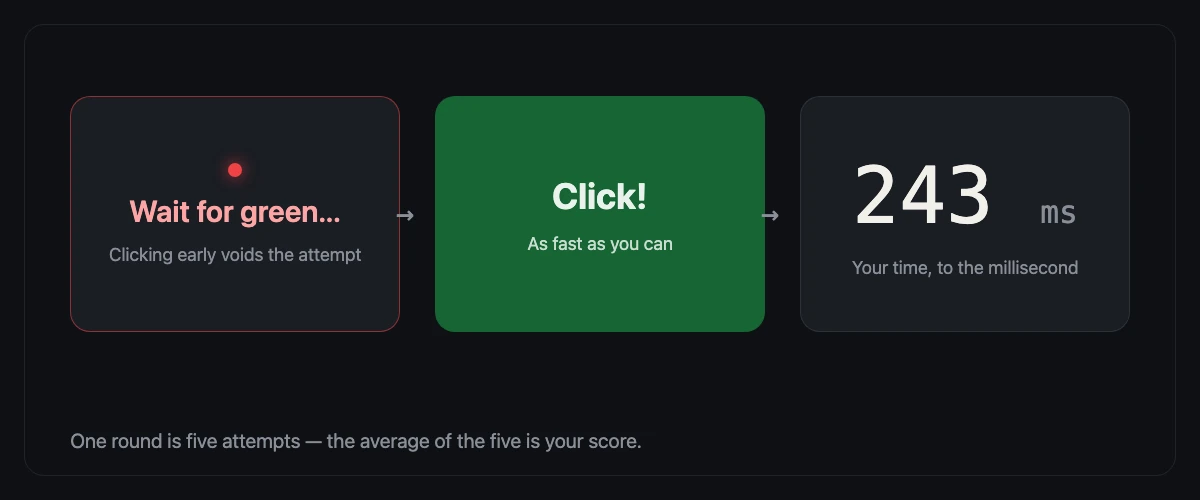
- Five attempts per round. Each round measures five attempts; your score is the average of the five — the result panel also shows the median and your fastest attempt.
- A random 1.5–5 second wait. After you click to start, the board waits a random 1.5–5 seconds before turning green. Clicking early voids that attempt — the board shows "Too soon!" — and you click again to retry.
- Results in milliseconds. Every score is shown in ms (1 ms = one thousandth of a second), rounded to the nearest whole number.
- Free, no download, no sign-up. The test runs in any browser, on desktop and mobile.
- Results stay on your device. Your history and best scores are stored only in this browser's local storage — nothing leaves your device unless you tap "Add my result".
For the complete measurement details, read how ReflexTimer measures reaction time. If you are comparing tools, we also maintain a hands-on comparison of Human Benchmark alternatives — checked against each site's live pages, including ours.
Why your score includes device latency
Your result is not pure nerve speed — the entire input chain sits inside the measurement. A 60 Hz monitor redraws only once every 16.7 ms, so the green can reach your eyes nearly a full frame late; a 144 Hz display cuts that to about 6.9 ms. Your mouse, trackpad, or touchscreen adds a few milliseconds of input processing, and the browser and operating system add display and compositing lag on top — roughly 30 ms on a typical desktop before your nervous system is even involved. Phones are usually slower than desktops, so a phone score and a computer score are not directly comparable. For honest comparisons, always test on the same device, at a similar time of day.
What is the reaction time test?
The reaction time test is a simple online reaction test that measures how quickly you respond to a visual signal. When you press start, the screen turns a waiting red; at a random moment it flashes green, and your job is to click — or tap — as fast as you can. The tool then shows your reaction speed in milliseconds, which is the exact time between the color change and your click.
Because a round takes less than a minute and needs no signup, this reaction time tester is popular with FPS and esports players who want a quick read on how sharp they are feeling, as well as with anyone curious about their human reaction time. One honest caveat: any click reaction test measures more than pure nerve speed. Your mouse, keyboard, or touchscreen, your monitor, and your browser all add a few milliseconds on top of what your nervous system actually did.
How to take the test
- Click the test area above to begin.
- Wait patiently while the screen stays red — clicking early voids the attempt, so don't jump the gun.
- The moment the screen turns green, click as fast as you can.
- Read your time in milliseconds, then keep going. Each round has five attempts, and your average across the five is the number that counts.
That is the entire online reaction test — no account, no app, no setup. Your best single time and your recent rounds are saved locally on this device, so you can come back and compare.
What is a good reaction time?
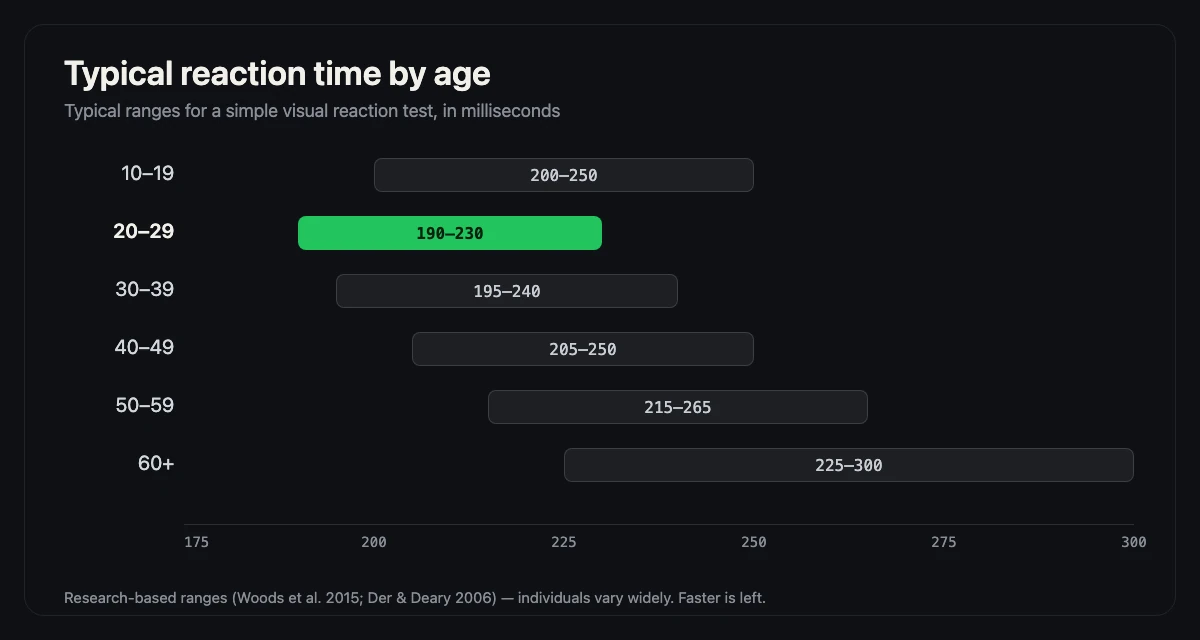
For adults, 200–250 ms is the normal range on a visual test like this one; under 200 ms is quick, under 170 ms is well ahead of the general population, and first attempts near 300 ms usually shrink within a few rounds. The full picture — averages by age, by stimulus, and across gamers and athletes — lives on our dedicated average reaction time page, with every number tied to a published source.
Reaction time rating table
The table below converts your five-attempt average into a plain-language rating.
| Average reaction time | Rating |
|---|---|
| 150 ms and below | Excellent |
| 151 – 170 ms | Very good |
| 171 – 190 ms | Good |
| 191 – 220 ms | Above average |
| 221 – 260 ms | Average |
| 261 – 350 ms | Below average |
| 351 – 500 ms | Slow |
| More than 500 ms | Training needed |
What affects your reaction time?
Several factors push your result up or down, and most of them have nothing to do with your reflexes:
- Age. Reaction time is fastest in the early twenties and slows gradually with age — a few milliseconds per decade is normal.
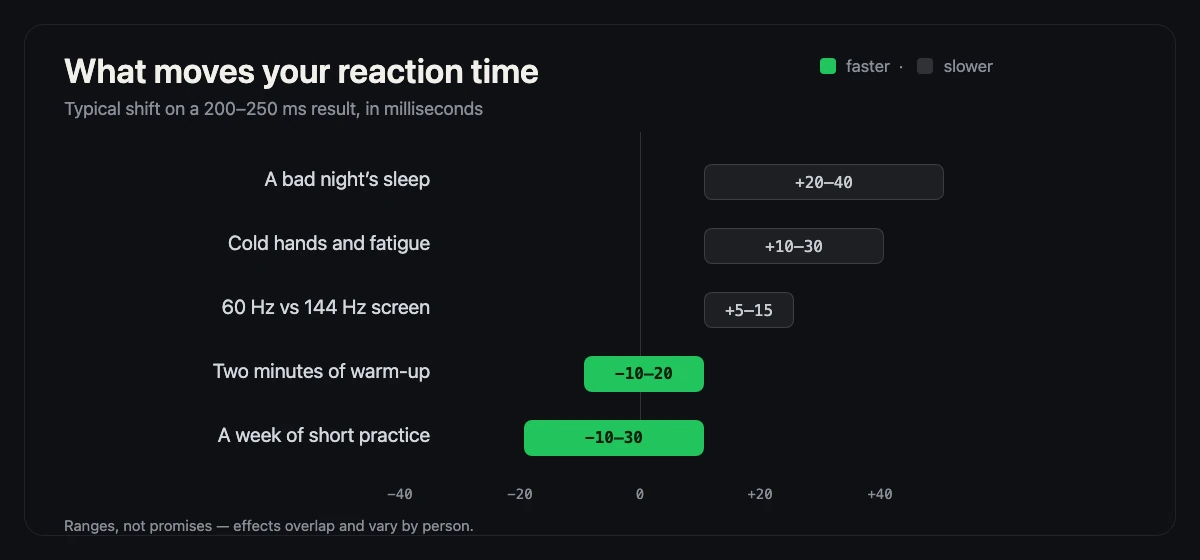
- Sleep and fatigue. A bad night can cost you 20–40 ms, more than most "training" routines will ever gain back.
- Attention and anticipation. Trying to predict the green instead of reacting to it usually backfires and produces false starts.
- Input device. A worn mouse micro-switch, a soft keyboard membrane, or a touchscreen all register clicks at different speeds.
- Display. Monitor refresh rate and panel lag matter; a 144 Hz screen shows the color change visibly earlier than a 60 Hz one.
- Body state. Caffeine gives a small, real boost, while cold hands, alcohol, and a full stomach do the opposite.
How to improve your reaction time
The biggest, best-evidenced levers are boring but real: sleep seven hours or more, warm up with two or three practice rounds, keep your eyes on the center of the screen, and cut device lag with a wired mouse and your fastest display. Honest gains are typically 10–30 ms — anyone promising more is selling noise. For the evidence behind each method, plus a 7-day training plan, see how to improve reaction time.
Reaction time vs. other measures
Reaction time measures a single, split-second response — one signal, one click. Clicking speed is a different skill entirely: it measures how many times per second you can repeat a click, which is about rhythm and finger technique rather than perception. The two correlate weakly at best, which is why serious players track both. If you want to test your clicking speed instead, try our CPS Test — it pairs naturally with this page, and many visitors run both in one sitting. Prefer a no-screen experiment? The ruler drop test measures reaction time with nothing but a ruler.
What this test does not measure
This page measures the time between a visual signal appearing and your click landing. It does not measure visual acuity, decision-making, aim, or how you perform in a sport. It also does not measure pure nerve conduction: the number includes display latency, browser scheduling, mouse or touch input, and the movement of your finger. That is why the page explains the measurement chain instead of presenting the result as a laboratory value.
For a stage-by-stage look at where those milliseconds go, read what a reaction time score really includes, or see how reaction time turns into metres in the braking distance guide. If you are comparing a phone with a computer, read mouse vs touchscreen reaction time first.
It does not measure a "reflex" in the medical sense. A reflex is an automatic response that bypasses deliberate control; this task asks you to see a signal and choose to click. The word "reflex test" is a common search term, but the task is a deliberate reaction-time test. If you need a clinical assessment, use a qualified professional rather than a browser game.
How the five-attempt average is calculated
Each round collects five attempt times in milliseconds. The score shown on the board and in the result card is the arithmetic mean of those five attempts: add the five numbers and divide by five. The result card also shows the median and your fastest attempt, because the three tell slightly different stories. The mean is sensitive to one very slow attempt; the median is not. If you sneeze on the fourth attempt, the mean moves more than the median, which is why both are shown.
A single attempt is a sample from a noisy process. Attention drifts, the browser schedules work in small chunks, and your finger does not move identically every time. Five attempts reduce the influence of one outlier, but they do not eliminate variance. A difference of a few milliseconds between two rounds is usually noise; a consistent shift across several rounds is more likely to be a real change in your state or setup.
Reading your score as a measurement
Treat a round as a measurement with error bars, not a verdict. The device matters: a 60 Hz laptop, a high-refresh monitor, a wireless mouse, and a phone all contribute different latency. Your state matters: sleep, caffeine, warm-up, and whether you were distracted all move the result. The conditions matter: the same browser, the same display, and the same input method are necessary for a fair comparison.
The most useful personal benchmark is a repeated one. Take a round under similar conditions on a few different days, note the setup, and compare medians rather than single sessions. If you change one thing — a new mouse, a different monitor, a cup of coffee — keep everything else the same and see whether the change is larger than your normal day-to-day variation. That is the same logic a careful measurement study uses, scaled down to a browser test.
Why the rating is not a percentile
The rating word comes from this site's eight-band scale, not from a population study. It exists so a raw millisecond number has a quick interpretation, and it is computed from the same value shown on screen so the word and the number cannot disagree. It does not tell you what percentage of people you beat, and it does not adjust for age, device, or experience.
Use the word as a rough label and the millisecond value as the real data. If you want context for the number, the average reaction time page breaks down published ranges by stimulus and age, and the Methodology page explains how this test is built and scored.
Why the first attempt is often slower
The first attempt of a round carries a small decision cost: you have to register the green, choose to move, and start the click. Later attempts settle into a rhythm. That is why the five-attempt average is more stable than a single-click score, and why a warm-up round is useful before a comparison. It is also why the first attempt is not discarded: it is part of the task, not a mistake.
Frequently asked questions
What is the average human reaction time?
Research generally places the average adult visual reaction time between 200 and 250 milliseconds. Anything in that range is normal, and being slightly above it says very little on its own.
Is 200 ms a good reaction time?
Yes. A consistent average around 200 ms puts you comfortably within — and toward the faster end of — the normal adult range, and ahead of most casual testers.
Can I improve my reaction time?
Modestly, yes. Better sleep, regular short practice, and lower device lag typically buy you 10–30 ms. There is no shortcut past that, and anyone selling one is selling noise.
Does reaction time get worse with age?
It does, gradually. The decline is a few milliseconds per decade and is gentle enough that sleep and practice can mask it for years.
Why is my reaction time different every time?
Because the test samples a noisy system. Attention, anticipation, device lag, and simple randomness swing individual attempts by 30–80 ms, which is exactly why this tool averages five attempts per round.
Does screen refresh rate affect reaction time?
Yes — through display lag rather than your nerves. A higher refresh rate shows the green sooner and renders your click sooner, which is why scores across different monitors are only roughly comparable.
How many attempts should I do?
Five per round is the standard, and the average of five is far more meaningful than any single attempt. If your numbers keep drifting downward across rounds, keep going until they plateau.
Is reaction time the same as aim?
No. Reaction time is one part of aiming — the trigger moment. Tracking, crosshair placement, and hand-eye coordination are separate skills that a reaction test does not measure.
What is a milliseconds test?
Milliseconds test is a common way of searching for a reaction time test. This page measures how quickly you respond to a visual signal and reports the result in milliseconds — the lower the number, the faster your response.
Is 250 ms a good reaction time?
Yes — 250 ms is inside the normal adult range of roughly 200–250 ms, so it is a normal result rather than a slow one. Single attempts vary by 30–80 ms, so judge your five-attempt average rather than one number.
Is this a reflex test or a reaction time test?
It is a reaction time test. A reflex is an automatic spinal response, such as a knee jerk, that you cannot time on a screen; this page measures a deliberate response — seeing the signal and clicking. Reflex test and reflex timer are common everyday terms for the same kind of test.